Monday, 21 November 2011

Components Made For The Library

I created all of the objects which are found in the library area and in this post, I will describe how each of them were made and describe any of the techniques used in order to make them. 

Bookcase

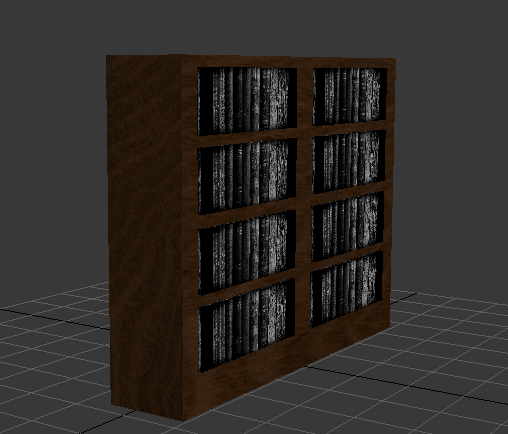
The bookcase was made of primitive box shapes which were adjusted so that the "books" to go in the shelf will be slightly overlapping. The image below shows this: 


Materials were then added to the boxes to make them look more realistic. A bump texture modifier was applied to make the wood look more lifelike. I also increased the shine to make it look more realistic under different lighting conditions. Also the actual shelves cannot be animated themselves, we intend to show a character interacting with the bookcase and "reading" a book item from it. This is intended to give the person viewing the short clip an idea on what the library can be used for.

Photocopier 

The photocopier was constructed out of box primatives with materials placed on top of them. UVW Map modifier was used to ensure that the touch-screen user interface is positioned correctly on the object. 

In order to animate the photocopier, the drawers could be moved in and out and the pivot point can be modified on the scan lid so that it opens and shuts. A silhouette could be seen utilising the photocopier and this could be vital because when one of our group members contacted the Guildhall committee, we were told that this will be the only photocopier in the village that the whole public can use.


Computer Desk With Components

The computer desk was made in a similar kind of fashion to the bookcase. Again, primitive box objects were created an arranged so make it look like a table:


Materials were added with a bump texture and shine effect to make it look more realstic. One of the good points about creating the desk in this way is that the legs can be shortened so it can be used as a coffee table for the library and any of the other rooms that may require one. It can also be adapted as a normal regular table by increasing the size of the tabletop.


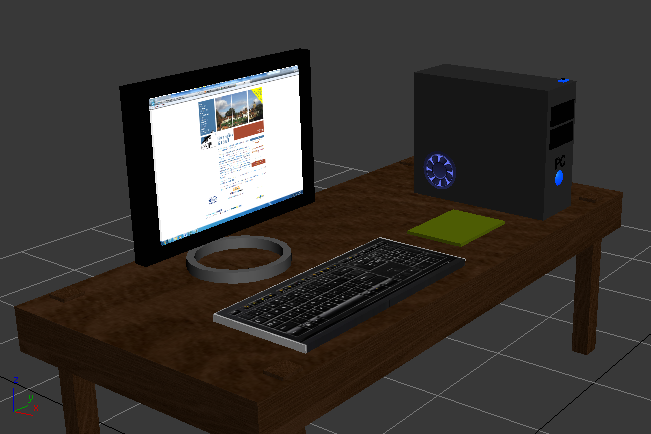
The image below shows the desk with all of the computer components on it. All of the computer parts are comprised of shapes. If the textures did not fit on them correctly, I used UVW map to rotate and move the textures into position. The button on the computer lights up and the computer fan is animated so that it rotates. The plan is to display a character using one example of the computer within the library to demonstrate how a person would work in the library.


However, a computer desk is not complete without a computer chair:

Computer Chair

Firstly, I created a cylinder and converted it to an editable poly. This allowed me to select the polygons or vertices I want to delete in order to make the back of the chair. The image below shows this:

Next, I created a copy of the chair back and rotated it. In order to gain a more lifelike shape, I added a slight rotate to the back of the chair and increased the height slightly.

The next step was to create the base of the chair. Identical cylinders were created and converted to editable polys. This allowed me to adjust the shape so make them look more like the base of a swivel office chair.


Next, I created the wheels and added a covering over the top, again by selecting the polygons I did not want and deleting them.

The following image shows the base of the chair with the wheels attached to it. All that had to be added was a couple of tubes to recreate the stand which connects the base to the chair seat and a primitive box to secure both the seat and the back of the seat together.


Here is the chair in its finished form after materials were added to it. In order to animate it, the actual seat can be swivelled like in real life and the wheels can rotate so it can move backwards and forwards.  However, we intend on using silhouettes to demonstrate how the Guildhall is used so a silhouette will be positioned on it using the computer. Perhaps, to make it look even more realistic, I could animatethe silhouette sitting down on the chair and pulling it up towards the desk.


Here is the finished article:

Fireplace

Two of the key features to the library in the Guildhall are the two fireplaces which form the centrepieces to the room. The basic shape was created using primitive box shapes alligned:
Again, textured bumps were used to make the stone surface of the fireplace look more authentic. The image below shows how this was done:


As you can see from the image below, the texture on the fireplace was not alligned correctly and the stoens have been stretched out across the box shapes, making them look unsightly.


UVW map modifier was used in order to correct this:


In order to create the fire, I used particles which I have never used before so I gained a new skill. My first attempt did not work as planned because the fire was too big and it did not look as realistic because there were no logs. However, after making some adjustments and adding some logs (see image below) The fire looked much more realstic.


The video below shows the fire in action:


A chimney breast will also need to be constructed because the new plan is to have the chimneys outside puffing out smoke. In order to keep the building as lifelike and realistic as possible, this is an object which will needed to be added before the final render.

Armchair

Armchairs can be used in more places in the Guildhall however they are primarily based in the Library next to the fire. The basic shape was created with box primitive shapes. I then used the Chamfer Tool which I have not used before, to add more polygons on the chair arms to make them look more rounded and give a better effect when the shapes are smoothed.


The image below shows the chair TurboSmoothed. After applying the modifier, it became apparent that the back of the chair was not wide enough and looked a bit perculiar. Therefore, I adjusted the back of the chair.


The image below shows the finished chair shape. No material has been added because depending on what room the chair is placed in, the material could be different.


--------------------------------------------------------------------------------------------------------------------
References

123rf.com
2011
Oak bark for logs in fireplace
Available online at: http://us.123rf.com/400wm/400/400/llepet/llepet0907/llepet090700099/5191848-oak-bark-texture-material-background-decoration.jpg
Last Accessed: 23/11/2011

DeviantArt
2011
Material texture for the office chair
Available online at: http://fc02.deviantart.net/fs32/i/2008/225/f/c/Carpet_TEXTURE_by_she_sinsstock.jpg
Last Accessed: 23/11/2011

DeviantArt
2011
Library book texture for bookcase

Available online at: http://fc07.deviantart.net/fs71/i/2010/241/6/7/books_texture_by_lestatis-d2xit4k.jpg
Last Accessed: 23/11/2011

Facebook
2011
Duck image for the mouse mat

Available online at: https://www.facebook.com/photo.php?fbid=10150345712043381&set=pu.273096853380&type=1&theater
Last Accessed: 23/11/2011

Glenview Doors, Inc.
2011
Wood texture for bookcase and computer desk
Available online at: http://www.glenviewdoors.com/PRODUCT-DETAILS/WoodSamples/PopUp-600x350/Ash-Dark.jpg
Last Updated: 04/09/2011
Last Accessed: 23/11/2011

Iconshock by Unusual Minds
2011
Texture for computer fan
Available online at: http://www.iconshock.com/img_jpg/BETA/computer_gadgets/jpg/128/cpu_fan_icon.jpg
Last Updated: 19/06/2008
Last Accessed: 23/11/2011

Logitech
2011
Keyboard texture
Available online at: http://www.logitech.com/repository/1170/jpg/9726.1.0.jpg
Last Updated: 19/06/2008
Last Accessed: 23/11/2011

Love Textures
2011 
Stone texture for the fireplace
Available online at: http://www.lovetextures.com/wp-content/uploads/2010/may/textures-large-6.jpg
Last Updated: 27/10/2011
Last Accessed: 23/11/2011

Thursday, 17 November 2011

Components Made For The Kitchen

Oven/Cooker

The first component that I made for the kitchen was a cooker. It was fairly straightforward to make. Firstly, I made a cube and added four small cylinders to the top of it. The door was made up of a smaller cube. The handle consists of two small cylinders and one larger cylinder. 


Next, I applied materials to the cooker to make it look more realistic using the Material Editor and the UVW Map modifier. The handle has been given a realistic metal effect.


The images below show the two materials that I made myself using a paint program. The rings have been placed on the cooker hobs and the clock/timer has been placed on the front of the cooker in the middle.
 

After applying the finer details, I added some buttons and dials to the cooker to make it look more lifelike. The final image shows the final rendered result. If it was to be animated, the door can opened and shut using the rotate tool. If one of the group members were to make a saucepan or a frying pan, food could be animated cooking.


Counter

One of the main components which can be used in various places in the Guildhall and not just the kitchen alone is a counter. The counter was simply made from three boxes with a granite and dark hardwood texture applied. In order to make the wood look more detailed, I used a bump modifier using the same image, set at 130%. The counter can be adapted to create cupboards and drawers.


Fridge

Another vital appliance for the kitchen was the fridge. Due to time constraints, I could only use a UVW Map with an image of a fridge on a box shape. This means that I would not be able to animate it and it would act as a static model instead. However, this is not necessarily a bad point because
it will act as a good model to create a kitchen atmosphere.


Mugs/Cups

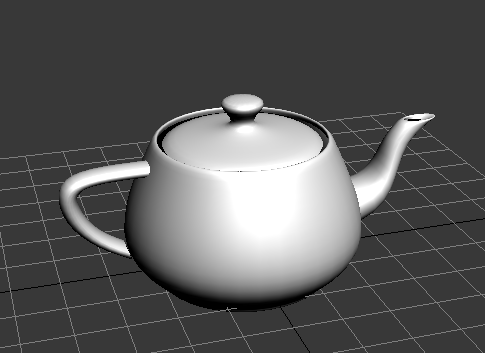
Mugs and cups are good examples of "kitchen clutter" and can also be used at the Guildhall entrance for use with the tea set and the coffee machine. In order to make them, I created a teapot primitive shape, converted it to an editable poly and selected the polygons on the lid. These were then deleted:


 The spout of the teapot was also deleted:


This leaves a very simple cup shape:


Before I carried out any more edits to the shape, I added a material in order to make it look porcelain and more realistic. I ensured that the shine was quite high so that when the environment lighting falls on it, it shines without a reflection.


After using the TurboSmooth modifier, I extended the height of the cup to improve on the quality of the shape. The image below shows the final result:

Saucers/Plates

Saucers will be needed to go with the mugs/cups and plates will be needed in the kitchen to serve food on. These were very simply created by making a cylinder and increasing the number of cap segments. Using soft selection in vertex mode, I selected the middle vertex and moved it down. The brighter the red, the more effect the movement has on that particular vertex. This created an ideal method to create a plate "rim". The same porcelain material that was placed on the cups was placed on the saucers to ensure that they matched.


As you can see from the image below, the shape is still very basic and rough around the edges:


Therefore, I used the TurboSmooth modifier and this is what has provided the best saucer/plate looking shape.

Teapot

The teapot was created with the teapot primitive shape, was TurboSmoothed and had the porcelain material added to it.


 -------------------------------------------------------------------------------------------------------------------
References

Glenview Doors, Inc.
2011
Wood texture for counter
Available online at: http://www.glenviewdoors.com/PRODUCT-DETAILS/WoodSamples/PopUp-600x350/Ash-Dark.jpg
Last Updated: 04/09/2011
Last Accessed: 24/11/2011

John Lewis
2011
Freezer image
Available online at: http://s7v1.scene7.com/is/image/JohnLewis/231054811
Last Accessed: 24/11/2011

World Of Stock
2011
Granite counter worktop texture
Available online at: http://www.worldofstock.com/slides/BGT2449.jpg
Last Updated: 15/03/2009
Last Accessed: 24/11/2011

Friday, 11 November 2011

Sketches showing example items in the Guildhall building.

I was given the task of making sketches for example items that will be included in the final building. The purpose of these sketches was to determine what modifiers and techniques will be needed in order to make the models. The idea was also to demonstrate how certain components can be animated.

Research Methodology Report

Research Methodology Report

The purpose of this report is to identify the different mediums of research available to us for use and how these mediums can be used in order to obtain the information required to start the development of the 3D model. 

There are two main types of research which will be used extensively during this project; primary research resources and secondary research resources. 

What is primary research? 

Primary researches are “Experiments, investigations, or tests carried out to acquire data first-hand, rather than being gathered from published sources.” (Business Dictionary, 2011). This means that the research that you discover will be your own and you can take credit for it. 

Examples of primary resource:

·         Questionnaires
·         Interviews
·         Focus Groups
·         Observation
·         Surveys

How this kind of research can be used to benefit the project

The primary research that is going to be using in this project is an observational visit of the Finchingfield guild hall. A guide was there to take us around the building and we were allowed to take photographs and ask questions about the renovations which will be taking place. This will be vital because the photographs will allow us to capture the materials and the current structural design of the guildhall. The guide also answered questions concerning how the building will look once the renovations will be finished. He also provided us with secondary research material, which will be discussed in the next section. 

What is secondary research? 

Secondary research is “Primary data that was collected by someone else or for a purpose other than the current one” (Business Dictionary, 2011). This means that the research that you discover will be someone else’s therefore you must give credit to them if you use them to help you in your own work.  

Examples of secondary resource:

·         Online sources
·         Books
·         Leaflets
·         Magazines
·         Maps

How this kind of research can be used to benefit the project

During the Finchingfield trip, the guide gave us a leaflet containing information on the guildhall and also all the renovations that will be taking place. On the leaflet, there is a floor plan on what everything should look like once the renovations are complete and what each room will look like. This will be very useful because the design can be drawn out on paper before we begin to model using the software, reducing the chance of making mistakes. We will also be using online sources, such as the Finchingfield website, to help us by filling in the gaps in our information that we did not find out ourselves on the trip. 

--------------------------------------------------------------------------------------------------------------------
References
Business Dictionary
2011
Primary research definition
Link: http://www.businessdictionary.com/definition/primary-research.html
Last Accessed: 09/10/2011

Business Dictionary
2011
Secondary research definition
Link: http://www.businessdictionary.com/definition/secondary-data.html
Last Accessed: 09/10/2011